What building a lil virtual machine taught me
From ‘bugs fixed’ to ‘bruh’ in 39 seconds: printf debugging, learning what a program needs, and the beginnings of Simantic.
The cracked people in Electrical Engineering were all going through Ben Eater's 8-bit computer tutorial. I kinda wanted to make something substantial in software to solidify what it meant to be in Computer Engineering. But my pea brain couldn't wrap itself around what an OS really was, so I settled for a lil virtual machine.
I hadn't even taken an OS class yet. I could name computer parts without understanding how they worked together. Building a small version in C gave me somewhere to start.
Giving a program its own computer
My lil virtual machine emulates LC-3, an educational computer architecture. An architecture defines the instructions a processor understands. An ARM or x86 processor can't directly execute LC-3 instructions, so my C program does the interpreting.

The “computer” starts with arrays: one represents LC-3 memory, holding the program's instructions and data; another holds its registers, the processor's small storage slots. A program counter tracks which instruction to read next.
The VM reads that instruction, decodes what it asks for, and updates those arrays. An LC-3 addition becomes C code that adds two stored values. A memory write changes an array entry. Then the loop repeats. Underneath, my actual processor is executing the compiled C program.
That's how it “tricks” the LC-3 program: it supplies the memory and instruction behavior the program expects. It doesn't need physical LC-3 silicon. I wasn't recreating every gate; I was recreating their effects on the values a program can see.
I knew arrays and loops. How hard could it be...
“bugs fixed” → “bruh”
My commit history tells this part better than I can.
On April 2022, instead of focusing on my exams I committed to finishing this project. In the same day fixing bugs bugs just for 30 seconds later to have a “bruh.” moment. Truly the pre AI coding coded.
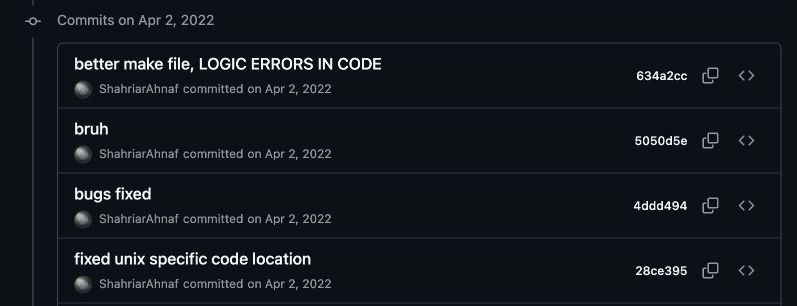
Actual commit history, newest first. Confidence was moving faster than correctness.
The next day wasn't much smoother: “gets to ansi prompt but no further,” followed by “small bug fix still not working VM.” Getting something to appear on screen and getting the program to work were apparently two different milestones.
One of the fixes was painfully small. I was reading the wrong bits of an instruction to select an input register. In one case, I shifted by five bits when I needed to shift by six.
If you've taken first-year digital logic(which is as low level as I got back then), imagine wiring up an adder correctly but connecting the wrong wires to the selector that chooses its inputs. It can add perfectly and still give you the wrong answer because you fed it the wrong value. That was the kind of mistake I was making in software.
That makes the project more useful to look back on than a clean final implementation. I can see the gap between recognizing the code and understanding what every part was doing.
Printf debugging (trace debugging for the pros)
Funnily enough, I barely used GDB or LLDB back then. I worked through this project with printf debugging—trace debugging for the pros.
The “added debugger” commit really is functions that print registers and memory. Nothing fancy. Print the state, run the program, and try to work out where it stopped matching what I expected.
“State” sounds more intimidating than it is here. It means the values the machine is holding onto: what's in each register, what's in memory, and where execution has reached. Those dumps were my view into the computer I was building.
Instead of only seeing a wrong answer, I could inspect the smaller changes leading up to it. That gave me something concrete to reason about. A tiny example is easier to follow by hand—just like coding by hand in an exam (doom).
The habit that stayed with me was making the program explain what it was doing. Choosing what to print forced me to think about what mattered. The logging was part of learning the machine, not just something I added after writing it.
Going beyond the tutorial
I started from Write your Own Virtual Machine by Justin Meiners and Ryan Pendleton. They deserve the credit for the tutorial and its foundation. My repository records me stumbling through it.
Around then, I was realizing that copying tutorials wasn't enough for me. I needed to break and modify things to understand them. The errors were annoying, but they gave me specific questions that reading working code hadn't.
I also tried making the VM faster by moving repeated instruction-decoding work into a shared part of the loop. That led to more logging and a Python script to compare timings. Looking back, I'd be more careful with those measurements: there are problems with how I handled timestamps and units, so I wouldn't repeat the old speedup claims today.
My explanations weren't finished either. The old README says registers only contain addresses. They don't; they can hold numbers and other values too. Keeping the project around lets me revisit those misunderstandings instead of pretending I understood everything when I wrote it.
What a program actually needs
The bigger question this opened up was: what does a program actually need from a computer?
For this lil virtual machine, it started with somewhere to store values and rules for changing them. But arithmetic alone wasn't enough. The program also needed input and output. My keyboard handling gave certain memory addresses special behavior so a program could check for input and read a character.
That was a connection I could follow all the way through: an instruction, an address, and code that made the outside world available to the program. The parts were starting to fit together.
Looking back, this was the start of my journey toward building the emulator at Simantic. The systems are more complicated now, but I'm still working on giving firmware the machine behavior it expects and making that behavior visible when something goes wrong.
I didn't have Simantic planned from the beginning. I was just trying to understand how computers work. Looking back now, I can see how nicely it all connected later as part of God's plan.
That's why I wanted this to be my first post. Being curious about how systems work never fails you as an engineer. Sometimes it start with a commit that just says “bruh.”
The source is here. If you want to build your own, the original tutorial is the starting point I used.